
السلام عليكم ورحمة الله وبركاته
نقدم لكم اليوم أزرار مواقع التواصل الاجتماعي بأسلوب جميل يمكنك إضافة صفحات موقعك على كل منها من خلال هذه الازرار لتمكين زوار موقعك من العثور عليك في مواقع التواصل ومتابعة جديدك
نقدم لكم اليوم أزرار مواقع التواصل الاجتماعي بأسلوب جميل يمكنك إضافة صفحات موقعك على كل منها من خلال هذه الازرار لتمكين زوار موقعك من العثور عليك في مواقع التواصل ومتابعة جديدك
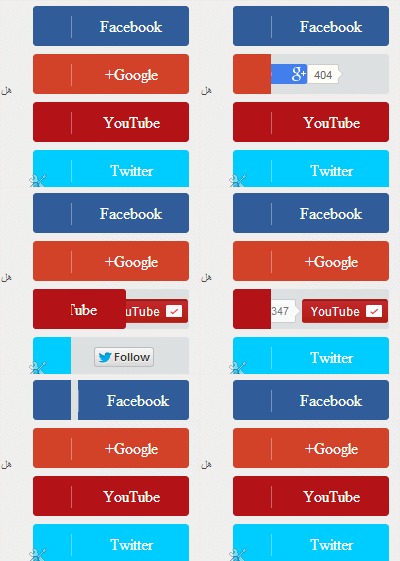
صورة الإضافة:
مثال حي:
كيف تضيفها إلى مدونتك
أذهب إلى لوحة التحكم في مدونتك – >> تخطيط – >> إضافة أداة ثم أختر اداة HTML / جافا سكريبت ثم أضف الكود التالي داخل الأداة
<style> .button { background: #DCE0E0; position: relative; display: block; float: left; height: 40px; margin: 4px; overflow: hidden; width: 156px; border-radius: 3px; -o-border-radius: 3px; -ms-border-radius: 3px; -moz-border-radius: 3px; -webkit-border-radius: 3px; } .icon { display: block; float: left; position: relative; z-index: 3; height: 100%; vertical-align: top; width: 38px; -moz-border-radius-topleft: 3px; -moz-border-radius-topright: 0px; -moz-border-radius-bottomright: 0px; -moz-border-radius-bottomleft: 3px; -webkit-border-radius: 3px 0px 0px 3px; border-radius: 3px 0px 0px 3px; text-align: center; } .icon i { color: #fff; line-height: 42px; } .slide { z-index: 2; display: block; margin: 0; height: 100%; left: 38px; position: absolute; width: 118px; -moz-border-radius-topleft: 0px; -moz-border-radius-topright: 3px; -moz-border-radius-bottomright: 3px; -moz-border-radius-bottomleft: 0px; -webkit-border-radius: 0px 3px 3px 0px; border-radius: 0px 3px 3px 0px; } .slide p { font-family: Open Sans; font-weight: 400; border-left: 1px solid #fff; border-left: 1px solid rgba(255,255,255,0.35); color: #fff; font-size: 16px; left: 0; margin: 0; position: absolute; text-align: center; top: 10px; width: 100%; } .button .slide { -webkit-transition: all 0.2s ease-in-out; -moz-transition: all 0.2s ease-in-out; -ms-transition: all 0.2s ease-in-out; -o-transition: all 0.2s ease-in-out; transition: all 0.2s ease-in-out; } .facebook iframe { display: block; position: absolute; right: 23px; top: 10px; z-index: 1; } .twitter iframe { width: 90px !important; right: 5px; top: 10px; z-index: 1; display: block; position: absolute; } .google #___follow_0 { width: 70px !important; top: 10px; right: 45px; position: absolute; display: block; z-index: 1; } .youtube #___ytsubscribe_0 { top: 10px; right: 1px; position: absolute; display: block; z-index: 1; } .facebook:hover .slide { left: 180px; } .twitter:hover .slide { top: -40px; } .google:hover .slide { bottom: -40px; } .youtube:hover .slide { left: -150px; } .facebook .icon, .facebook .slide { background: #305c99; } .twitter .icon, .twitter .slide { background: #00cdff; } .google .icon, .google .slide { background: #d24228; } .youtube .icon, .youtube .slide { background: #b31217; } </style> <div class="facebook button"> <i class="icon"> <i class="fa fa-facebook"></i> </i> <div class="slide"> <p> Facebook </p> </div> <iframe src="//www.facebook.com/plugins/like.php?href=http%3A%2F%2Fwww.facebook.com/mdadice&like&send=false&layout=button_count&width=80&show_faces=false&font&colorscheme=light&action=like&height=20&appId=568581339861351" scrolling="no" frameborder="0" style="border:none; overflow:hidden; width:80px; height:20px;" allowtransparency="true"> </iframe> </div> <div class="google button"> <i class="icon"> <i class="fa fa-google-plus"></i> </i> <div class="slide"> <p> Google+ </p> </div> <div class="g-follow" data-annotation="bubble" data-href="//plus.google.com/+مدادالجليد" data-rel="publisher"></div> <script type="text/javascript"> (function() { var po = document.createElement('script'); po.type = 'text/javascript'; po.async = true; po.src = 'https://apis.google.com/js/platform.js'; var s = document.getElementsByTagName('script')[0]; s.parentNode.insertBefore(po, s); })(); </script> </div> <div class="youtube button"> <i class="icon"> <i class="fa fa-youtube"></i> </i> <div class="slide"> <p> YouTube </p> </div> <div class="g-ytsubscribe" data-channel="monemoor" data-layout="default" data-count="default" data-onytevent="onYtEvent"></div> <script src="https://apis.google.com/js/platform.js"></script> <script> function onYtEvent(payload) { if (payload.eventType == 'subscribe') { // Add code to handle subscribe event. } else if (payload.eventType == 'unsubscribe') { // Add code to handle unsubscribe event. } if (window.console) { // for debugging only window.console.log('YT event: ', payload); } } </script> </div> <div class="twitter button"> <i class="icon"> <i class="fa fa-twitter"></i> </i> <div class="slide"> <p> Twitter </p> </div> <a href="https://twitter.com/mohammed1811990" class="twitter-follow-button" data-show-count="false" data-via="mariuCSS"> Tweet </a> <script> !function(d,s,id){ var js,fjs=d.getElementsByTagName(s)[0],p=/^http:/.test(d.location)?'http':'https'; if(!d.getElementById(id)){ js=d.createElement(s); js.id=id; js.src=p+'://platform.twitter.com/widgets.js';fjs.parentNode.insertBefore(js,fjs);}}(document, 'script', 'twitter-wjs'); </script></div>
غير كل من:
رابط صفحتك على فيس بوك بدلاً من mdadice
رابط او اسم ملفك الشخصي في جوجل بلس بدلاً من مدادالجليد
رابط قناتك على يوتيوب بدلاً من monemoor
واخير رابط او إسم ملفك الشخصي على تويتر بدلاً من mohammed1811990
ثم حرك الأداة حيث تريد ظهورها بعد الحفظ بالتوفيق.
هذا هو رابط مدونتي يمكنك رؤية الخطأ ;((
koon-awal.blogspot.com
لقد ادخلت معرف قناتك على يوتيوب بشكلٍ خاطئ تاكد من معرف القناة الخاصة بك
تسلم يا غالي 🙂 و شكرا للاضافات العظيمه و استمر و منكم نستفيد
مدونه طلبك عندنا
شكراً جزيلاً لك أخي محمود أتمنى لك التوفيق أيضاً :))